
AOL: Email News Weather
AOL Media LLCProductivity
4.154.54K Reviews
- Version
- Varies With Device
- Installs
- 10.00M
- Age Rating
- Everyone 10+
Screenshots



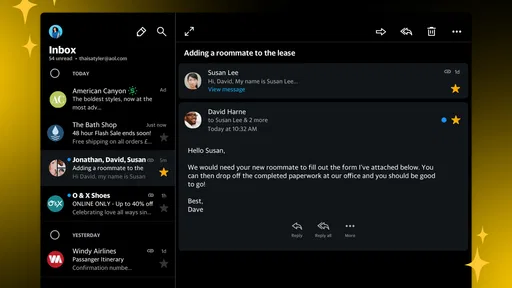
Our Review of AOL: Email News Weather
 Analysis by Appyee
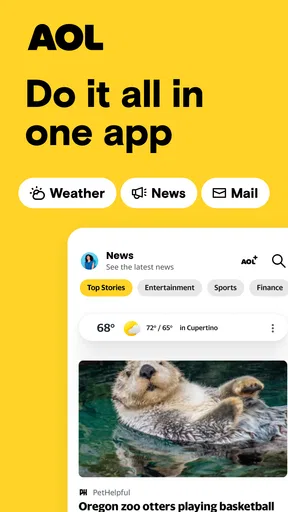
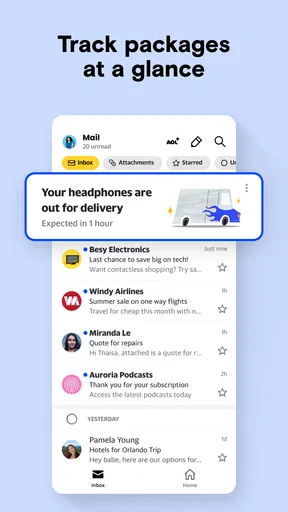
I approached AOL: Email News Weather as a practical question rather than a nostalgia trip: can one free app make everyday communication, headlines, and weather easier to manage than a collection of separate tools? After using it in that spirit, my answer is yes for a particular kind of user, although the convenience comes with compromises. It is best understood as a broad, general-purpose productivity app from AOL Media LLC, not as a specialist email client, a dedicated news reader, or a serious weather instrument.
The appeal is straightforward. Instead of opening several apps during the morning, I can use one place to check messages, scan current stories, and see what the day outside may look like. That sounds simple, but reducing small interruptions matters. I found the combined approach most useful when I wanted a quick overview rather than a deep session with any one service.
The app is free to install and is rated for Everyone 10+, which makes it approachable for a wide household audience. It has been available since July 22, 2010, and its long presence is reflected in a broad user base: the listing shows more than ten million installs, an average rating of 4.1 from roughly one hundred eighty-five thousand ratings, and around fifty-four thousand written reviews. Those figures do not make it perfect, but they do suggest that the all-in-one format has remained useful to many people.
What I would consider before choosing it
Before settling on it, I’d look at how often I genuinely need all three kinds of information in the same session, rather than assuming that fewer app icons automatically means a smoother routine. I’d also consider whether optional purchases and a broad, mixed-purpose interface feel acceptable for a tool I may only open briefly. That trade-off helps clarify where the all-in-one approach works best.
Start with your real morning routine
My first decision criterion would be how often you want to switch between apps. If your routine is “check email, glance at headlines, then look at the forecast,” the combined layout has a clear practical advantage. The app can act as a starting point for the day, especially when I only have a minute before leaving home or beginning work.
That advantage becomes less important if you already have a carefully organized email app, a favorite news reader, and a weather service that you trust. In that case, AOL: Email News Weather may feel like an extra doorway rather than a replacement. The right choice depends less on the number of available functions and more on whether you value consolidation over specialization.
Decide how much control you need
I would also ask whether you want a calm, focused inbox or a wider information dashboard. A dedicated email application usually makes email the center of attention. This app deliberately puts communication beside news and weather, so it is more suited to quick checking than to a highly structured productivity system.
For someone who manages many folders, relies on detailed message workflows, or wants an email-only environment with minimal distractions, a specialist alternative may be more comfortable. On the other hand, a person who mainly reads and answers ordinary messages while also wanting a quick daily briefing may appreciate the broader design.
Think about your news habits
The same distinction applies to news. I found the integrated approach convenient for discovering what is happening, but it is not the same as building a carefully curated reading system around selected publications or topics. If you want a fast overview, the app earns its place. If you want extensive customization, long-form reading tools, or a highly controlled source list, a dedicated news application is likely the better fit.
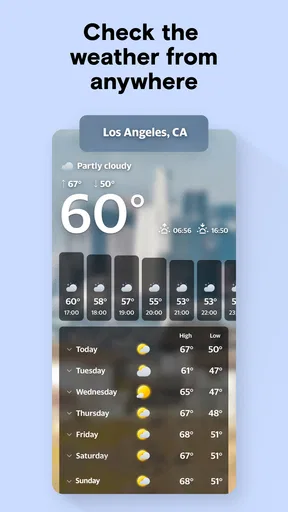
Weather is similarly useful at a glance. I would use it to decide whether to carry an umbrella, change clothing, or allow more travel time. I would not choose this app solely because weather is my main concern. A weather-first service is usually the more sensible choice for detailed forecasts, specialized conditions, or frequent planning around outdoor activities.
Keep the cost model in mind
The basic download is free, but in-app purchases are listed from $1.99 to $99.99 per item. That range is worth noticing before making any purchase. I would begin with the free experience and only pay after understanding exactly which addition solves a problem I actually have. The free entry point makes testing easy, while the broad purchase range means it is sensible to review each offer carefully rather than assuming every user needs an upgrade.
For readers who want a predictable, no-cost tool, the free starting point is attractive. For readers who dislike seeing optional purchase prompts in a utility app, that aspect may be a reason to prefer a simpler alternative. Either way, the important trade-off is not just price; it is whether the combined service saves enough time to justify keeping it in your daily rotation.
Where the all-in-one approach works best
I find the combined format most convincing when it serves as a quick decision point, not a place to spend the whole morning. A glance at messages, headlines, and the forecast can help me decide what deserves a closer look, while keeping the app from turning into another source of constant checking. The same convenience can be less useful when one category dominates my day, which is where a different category may fit better.
A useful first stop in the morning
The strongest use case I found is the short morning check. Imagine waking up with limited time before commuting. I can open the app, look over incoming email, skim the news, and check the forecast without mentally changing tools. That sequence gives me enough information to decide what needs attention immediately and what can wait.
The value is especially clear for people who do not want to build a complicated digital routine. A single app is easier to remember than a set of separate services, and it lowers the friction of checking basic information. I would recommend it to a family member who wants practical access to email, current events, and weather without spending time assembling a personal system.
Convenience without a steep learning curve
Because the app brings familiar daily tasks together, I did not need to treat it like a project-management tool or a technical dashboard. Its role is more modest: help me see the important parts of the day quickly. That makes it a reasonable choice for casual users, people returning to AOL services, and anyone who prefers a recognizable general-purpose app over a collection of narrowly focused products.
The category matters here. This is a productivity app, but not in the sense of managing complex tasks, calendars, documents, or team projects. Its productivity benefit comes from reducing app switching and combining information that I commonly check. That is a real benefit, but it should not be confused with deep organization features.
Three habits that make it more useful
My first practical tip is to treat the app as a triage screen, not as the place where every item must be handled immediately. I would check the inbox for urgent messages, scan the news for anything relevant, and use the forecast to make a simple plan. Then I would open a more focused tool only when a message or story deserves sustained attention. This keeps the combined format from becoming overwhelming.
My second tip is to separate information gathering from decisions. A headline can tell me what deserves attention, but it does not automatically deserve a full reading session. Likewise, a quick weather view can guide clothing or travel choices without becoming a reason to repeatedly refresh the forecast. Using the app in short, deliberate passes helps preserve its main strength: speed.
My third tip is to use it as a fallback hub when I am helping someone else with their phone. The broad combination of email, news, and weather is easy to explain in everyday terms. For a less technical user, that can be more approachable than teaching several unrelated apps, each with its own navigation and settings. The trade-off is that the person may eventually want more control than this general layout provides.
Why the established presence matters, and why it is not enough
AOL Media LLC has kept this app in the mobile landscape for many years, and its install count is now above ten million. That history can reassure users who prefer a familiar service rather than an unknown new utility. The 4.1 average also indicates generally positive reception, while leaving room for the ordinary frustrations that come with a broad app serving different expectations.
I would not treat popularity as proof that it is the best match for everyone. A large audience can include casual users, dedicated email users, and people who mainly want the news or weather view. The useful question is whether its particular combination matches your routine, not whether its overall audience is large.
Where a different category may fit better
The key question is whether I need breadth or depth: a general overview can be enough for routine checks, while demanding email organization, focused reading, or weather-dependent planning calls for more specialized tools. I’d judge the app against the task that matters most, rather than expecting one interface to excel equally at everything. If I do decide to move, it is worth considering what switching would actually involve.
Choose a dedicated email app for message-heavy work
If email is your main job, I would compare this app with a dedicated email client before switching. Specialist tools generally make more sense when your day involves sorting large volumes of messages, maintaining detailed folders, or following a strict response workflow. I would also favor that category if I wanted my inbox to remain visually and mentally separate from headlines and forecasts.
AOL: Email News Weather makes more sense when email is one of several daily checks. That distinction is important. The app is not failing when it does not feel like a full professional inbox system; it is serving a wider purpose. Users should choose based on the amount of control they need, not simply on whether email is present.
Choose a dedicated news reader for deeper reading
For someone who follows particular publications closely, a news-first app may offer a more satisfying experience. It can be easier to build a focused reading habit when the interface is designed around articles rather than around three information types. I would make that switch if I wanted to spend a substantial part of the day reading, saving, and organizing stories.
The AOL app is better for the first glance. I like the idea of seeing what may matter before deciding whether to investigate further. That makes it useful for awareness, but less compelling as the center of a serious research or long-form reading workflow.
Choose a weather-first service for specialized planning
Weather is one of the app’s convenient companions, but it is not the reason I would install it on its own. If you plan hikes, outdoor work, travel, or activities where changing conditions matter greatly, a dedicated weather tool may deserve priority. The combined app suits ordinary decisions such as clothing, commuting, and general scheduling.
This is one of the clearest trade-offs in the product. Having weather beside email and news saves a step, but a specialist service may provide a more focused experience for people whose plans depend heavily on atmospheric details. I would keep the AOL app for general awareness and use another category when weather becomes a central planning requirement.
Know who should probably skip it
I would skip this app if I already have a trusted set of separate tools and rarely want a combined dashboard. I would also look elsewhere if I need advanced productivity features, a distraction-free inbox, or a highly tailored news and weather setup. Installing another app will not improve a routine that already works smoothly.
It may also be a poor fit for users who are sensitive to optional purchase prompts or who want every function to remain strictly within one narrow purpose. The listed in-app purchase range makes it especially important to understand the free experience before committing to any paid extras.
What switching would actually involve
I’d make the transition gradually instead of replacing tools that already handle important tasks well. Using it first for a brief daily scan lets me see whether it saves effort, while leaving specialist apps available for work that needs more control. That kind of trial makes the choice practical: keep the combined app where it helps, and switch only the workflows that feel better served elsewhere.
The benefit is convenience, not instant transformation
Moving to this app is relatively easy to justify when the problem is scattered attention. I can replace several morning openings with one initial check and decide from there what deserves a deeper visit. That is the real switching benefit. It will not automatically reorganize my inbox, improve the quality of every headline, or turn a basic forecast into a professional planning system.
Before switching fully, I would run both approaches for a few mornings. I would note whether the combined view genuinely reduces time and whether I miss the controls of my existing email, news, or weather tools. This small trial is more useful than choosing based only on the promise of convenience.
Protect the workflows that already work
I would not abandon a dedicated service immediately if it handles an important responsibility well. For example, I might use AOL: Email News Weather for the first daily scan while continuing with another tool for intensive email organization or detailed weather planning. That hybrid approach avoids forcing one app to perform every role.
The cost of switching is therefore mostly behavioral. I need to learn where I prefer to read, which notifications deserve attention, and when to move from a quick overview to a specialist tool. The app can simplify the beginning of the workflow, but it does not remove the need for personal boundaries around alerts and reading time.
Questions I would answer before installing
Would I need to pay to try it? No: the app is free to start, though optional in-app purchases range from $1.99 to $99.99 per item. I would explore the no-cost experience first and avoid assuming that a purchase is necessary for ordinary use.
Is it suitable for a child? Its content rating is Everyone 10+, so I would treat it as an app for users aged ten and above rather than as a child-focused product. Adults setting up a shared device should still consider whether the news content and email access match the user’s needs.
Does it replace every other daily information app? In my view, no. It can replace the first few checks for many people, but dedicated email, news, or weather services remain better when one of those areas is a serious priority. The app’s strength is breadth, not maximum depth in every category.
Is it useful if I already use AOL email? That is the situation where I would examine it first, because the combined design can make the email account part of a wider daily routine. Even then, I would compare the experience with the email tool I already trust rather than switching automatically.
Can I use it casually without building a complicated system? Yes, and that is probably the best way to approach it. I would open it for a quick check, act on what matters, and leave. It does not need to become the control center for every digital task to be worthwhile.
My recommendation after weighing the trade-offs
I recommend AOL: Email News Weather to people who want a free, familiar starting point for email, headlines, and everyday weather information. Its strongest quality is the way it compresses several small routines into one accessible visit. For a busy morning, a shared household device, or a user who dislikes juggling separate apps, that can be genuinely helpful.
I would recommend it less enthusiastically to specialists. Heavy email users should compare dedicated clients. Serious readers should consider news-first services. People whose plans depend on detailed weather information should look at weather-focused alternatives. In each case, the other category may provide better control even if it sacrifices the convenience of the combined view.
The rating of 4.1 and the audience of over ten million installs make it a credible option to try, but they do not remove the need to match it to your habits. I see it as a practical overview tool: broad, accessible, and useful when I want the day’s essentials in one place. I would install it for convenience, keep my specialist tools for demanding tasks, and pay for anything only when the benefit is clear.
My final judgment is simple: choose it when reducing app switching matters more than having the deepest controls. That is where this AOL productivity app earns its place. If your priority is focus within one category, a dedicated alternative will probably serve you better; if your priority is a quick, uncomplicated daily briefing, this is a sensible free option to test.
Privacy and Permissions
See what permissions an app requests and how it handles your data.
- Identity
- find accounts on the device, add or remove accounts
- Contacts
- find accounts on the device, read your contacts, modify your contacts
- Location
- approximate location (network-based), precise location (GPS and network-based)
- Photos/Media/Files
- read the contents of your USB storage, modify or delete the contents of your USB storage
- Storage
- read the contents of your USB storage, modify or delete the contents of your USB storage
- Camera
- take pictures and videos
- Microphone
- record audio
- Wi-Fi connection information
- view Wi-Fi connections
- Other
- view network connections, create accounts and set passwords, full network access, change your audio settings, run at startup, draw over other apps, use accounts on the device, control vibration, prevent device from sleeping
Verdict
Strengths of AOL: Email News Weather
- Combines email, news, weather, and search in one convenient app.
- Supports multiple email accounts for easier inbox management.
- Customizable news topics help tailor the daily feed.
- Weather forecasts include useful alerts for changing conditions.
- Clean layout makes core features easy to find and use.
Limitations of AOL: Email News Weather
- Some features may feel crowded because several services share one app.
- News recommendations can become repetitive without regular topic adjustments.
- Advertising may appear throughout parts of the app experience.
- Advanced email organization tools are more limited than dedicated clients.
- Weather accuracy and detail can vary by location.
Similar Picks in This Category
View All
Google Calendar
Google LLC4.6

Google Drive
Google LLC4.3

Google Assistant
Google LLC3.9

Microsoft OneDrive
Microsoft Corporation4.6

Samsung Calendar
Samsung Electronics Co., Ltd.4.1

Microsoft OneNote: Save Notes
Microsoft Corporation4.6
Frequently Asked Questions
What is AOL: Email News Weather, and what can I use it for?
AOL: Email News Weather is a mobile app that combines AOL Mail with access to news, weather updates, and other AOL content in one place. After signing in, you can read, send, and organize emails while also checking headlines and local forecasts. It is mainly useful for people who already use an AOL email address and want a convenient mobile inbox.
Is an AOL account required to use the email features?
Yes, you need an AOL Mail account to use the app’s main email functions. You can sign in with your existing AOL username and password, or create an account if you do not already have one. Without signing in, some news and weather content may still be accessible, but sending, receiving, and managing email require an active AOL account.
Does AOL: Email News Weather send notifications for new emails and news?
The app can provide notifications for incoming messages and other updates, depending on the permissions you allow and the notification settings selected inside the app and on your device. You can usually adjust which alerts are displayed, helping reduce interruptions. If notifications do not appear, check both the app settings and your phone’s battery or background-activity restrictions.
Can I use the app to check local weather and read personalized news?
Yes, the app includes weather information and news content designed for mobile users. You can generally set a location to view local conditions, forecasts, and related updates, while news sections may show stories based on available preferences and interests. Content, accuracy, and personalization can vary by region, so some features may not be identical for every user.
Is AOL: Email News Weather free to download and use?
The app is generally free to download, and its core email, news, and weather features can be used without purchasing a premium subscription. However, it may display advertising, and mobile data charges can apply when using cellular networks. Availability, account options, and certain content may change over time, so review the store listing and AOL’s current terms before installing.
